

SHEET 00 — ENGINEERING SOFTWARE FOR HVAC MANUFACTURERS
The right product.
Selected, simulated,
documented.
Selection software, simulations, BIM/Revit families and HVAC calculations built on your own product data — for global HVAC brands and the fast-growing manufacturers competing with them.
- SELECTION TIME
- −85%*
- RIGHT PRODUCT
- +95%*
- PROGRAMS BUILT
- 14
- SUPPORT
- 24/7
* Measured in G2W selection-software projects.
Office L02
Swirl diffuser 400
M-101 · 1:50
[Your brand] · G2W
SHEET 00P — PACKAGE PROGRAMS · 14 READY TO LAUNCH
See all package programs
SHEET 00A — TRY IT IN 3D
Try it. Turn the product in your hand.
Change the size, the blade angle and the finish — the model and its dimensions update instantly, ready for PDF, DXF and Revit.
G2W · 3D PRODUCT VIEWER
Supply grille
EXAMPLE-200-100
Blade angle
Finish
232 × 132
184 × 84
SHEET 01 — SERVICE REGISTER
Eight disciplines. One engineering partner.
| NO. | DISCIPLINE | WHAT YOU GET | OUTPUT |
|---|---|---|---|
| 01 | Design tools | Configurators that build a valid product from requirements — with price and product tree | DRAWING · 3D · BOM |
| 02 | Selection tools | The right model, size and options from your own catalogue | REPORT · DATASHEET |
| 03 | Simulation tools | Airflow, throw and indoor climate shown in the real room | ROOM VIEW · COMFORT |
| 04 | Calculation tools | Performance and sizing engines on your test data — coils, fans, dampers | CALC REPORT |
| 05 | BIM & Revit families | Complete parametric families with real performance data | .RVT · IFC |
| 06 | Engineering consulting | Mechanical and HVAC engineers for products and projects | STUDY · REVIEW |
| 07 | Load & energy analysis | Peak heating and cooling loads, overheating hours, PPD, annual energy use | kW · h · % · kWh/a |
| 08 | Acoustics | System sound from fan to room — studies, software, consulting | dB(A) · NR |
SHEET 02 — DRAWING SET · WHAT WE ENGINEER
From diffuser to air handling unit.
Ready-made packages you can launch fast — or new tools we build from scratch for your products.
SELECTION · SIMULATION
DESIGN · SIZING
ACOUSTICS · SELECTION
DUTY POINT · EFFICIENCY
THERMAL COMFORT
CALCULATION
PROJECT DRAWING
ACOUSTICS · NR
Every program delivers calculation reports, drawings and datasheets. See all 14 package programs →
SHEET 02B — CLOUD
On every screen your customers use.
Design office, site visit or meeting room — runs on Windows, macOS and iOS, nothing to install, always up to date.
SHEET 02C — READY-MADE SUITE
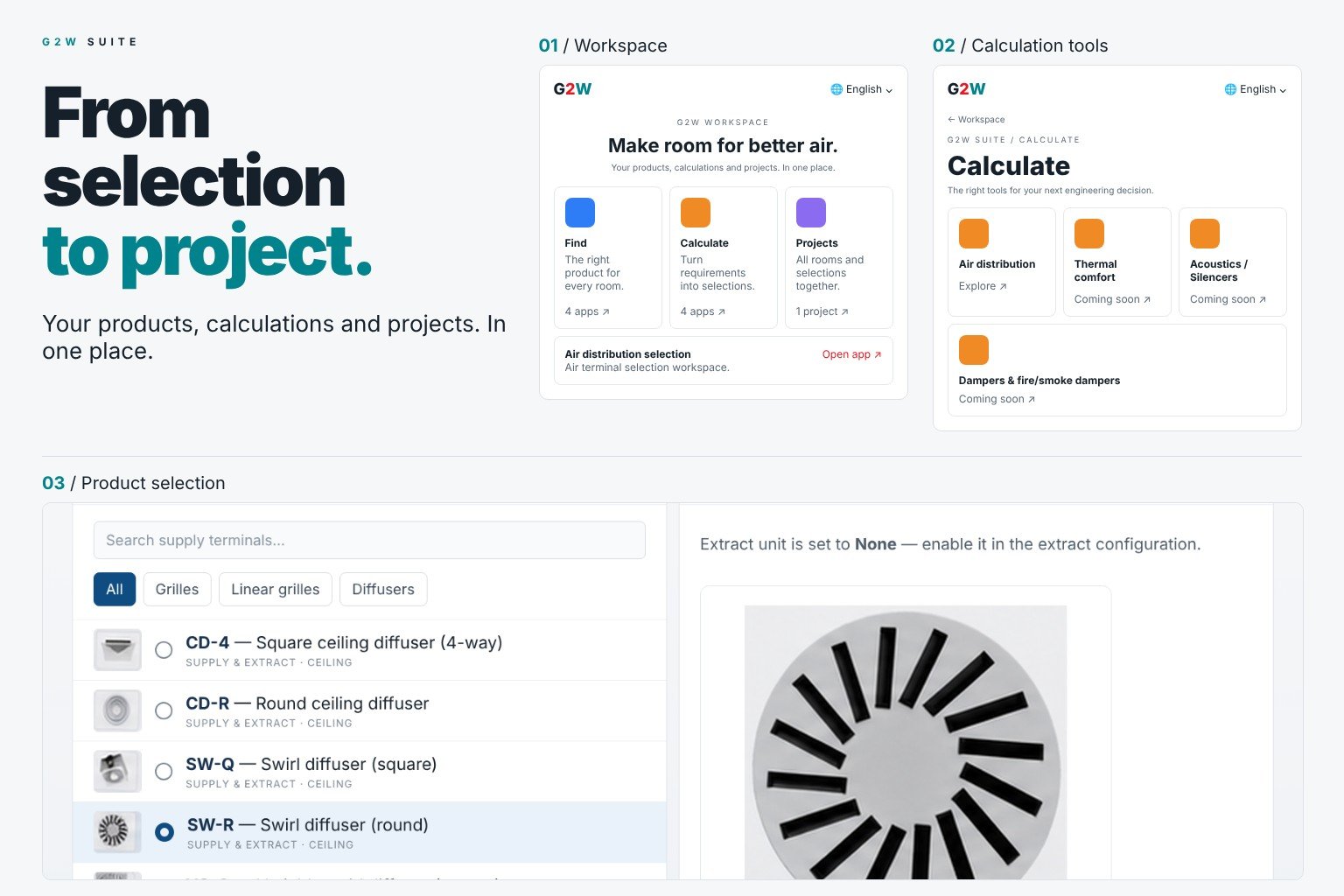
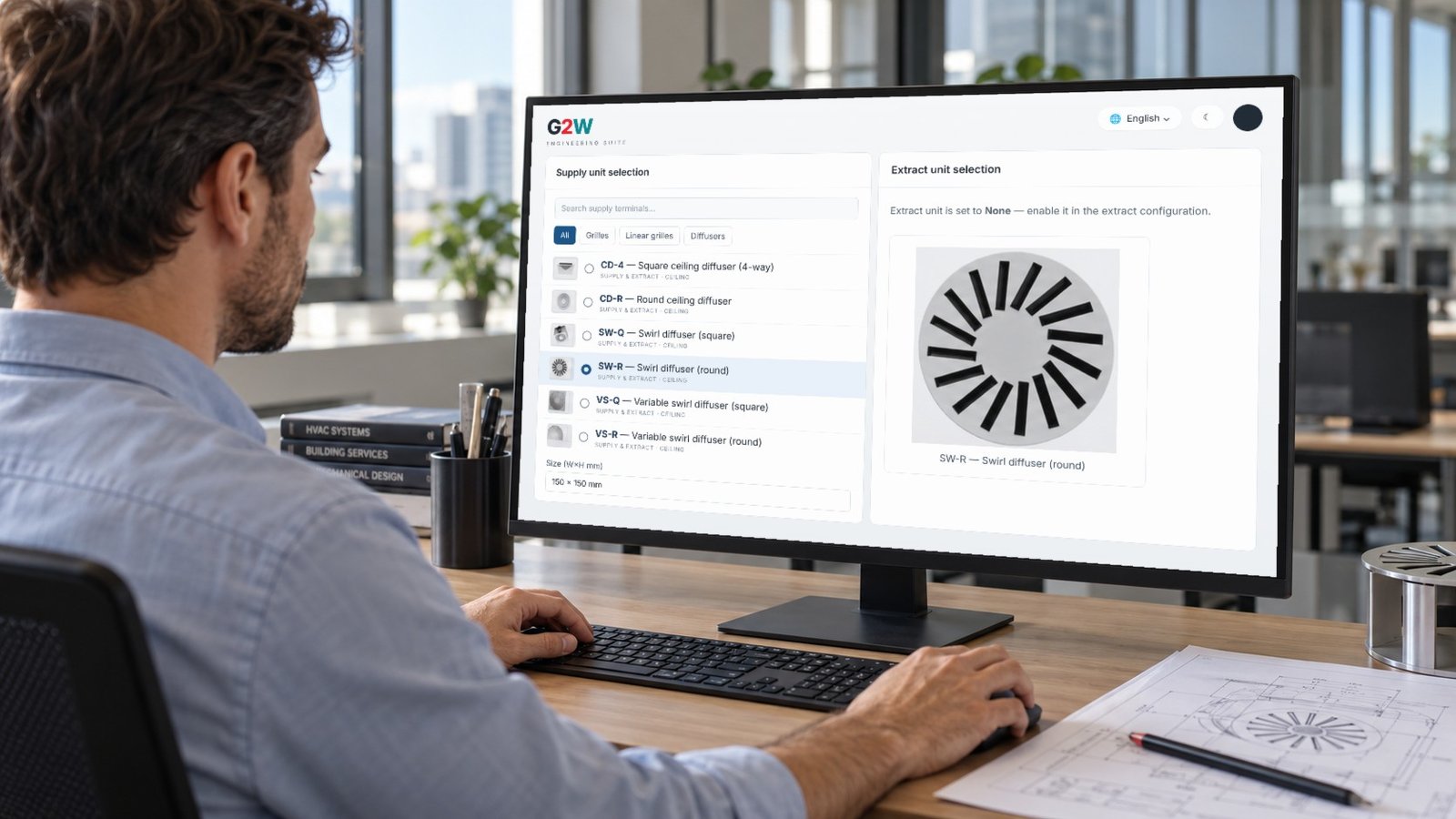
The G2W Engineering Suite: from selection to project.
A complete workspace for an HVAC manufacturer — product finder, calculation tools and project management, from selection to project.
- TYPE
- Ready-made package · white-label
- SCOPE
- Air terminal selector · convector selection · calculation tools · reports
- LANGUAGES
- Multilingual
- DELIVERY
- Cloud · always up to date
- PLATFORMS
- Windows · macOS · iOS
SHEET 02D — INSIDE THE TOOLS
Inputs in. The right product out.
This is what an engineer sees when selecting your products: duty point, results ranked, report ready.
0:30 · REAL SELECTION · LOOP
Air terminal selection. A complete selection in 30 seconds: room and duty in, the recommended diffuser out, then the airflow in section, plan and 3D.
Live screens · example project
SHEET 02E — TRY IT YOURSELF · LIVE DEMO
Try our software yourself.
This is a working demo, not a video. Enter your room, the number of diffusers and the temperatures, press play — and watch the supply air, throw and layout check update live.
TRY ITG2W · ROOM AIRFLOW SIMULATOR
Ceiling diffusers in your room
Good layout. Throw matches the spacing; air stays at the ceiling and reaches the occupied zone gently.
Illustrative simulation · selection engine runs on your test data
Imagine this with your own products. Your diffusers, your test data, your brand — on your website.
Request a demo for your products →SHEET 03 — THE TOP LEAGUE
PDF catalogues and spreadsheets can't keep up. The top league runs on software.
| YOUR CUSTOMER NEEDS | LEGACY | WITH G2W |
|---|---|---|
| A product selection | Email the sales team, wait days | Online, in seconds |
| Your product in their BIM model | Generic block, drawn by hand | Your Revit family with real data |
| Calculation and sound data | Catalogue tables, manual interpolation | Exact values from your test data |
| Report, drawing, datasheet | Prepared by your engineers, one by one | Generated automatically, in your brand |
| Quote and price | Spreadsheet, error-prone | Instant, from your price logic |
SHEET 04 — DIGITAL READINESS CHECK
Are you in the top league?
Tick what your company already has.
Your competitors are ahead. We can change that.
SHEET 05 — BUILT FOR EVERY DESK
Choose your door.
FOR OWNERS & MANAGEMENT
Grow into new markets.
Your customers choose faster and choose right. Your team stops losing days on quotes, reports and datasheets — and your products appear in the BIM models designers use.
See the business case →- →Faster quotes, more projects won
- →Your products inside designers’ Revit and BIM models
- →Top-league tools without building a software team
- →Every new tool: a new market and more loyal customers
SHEET 06 — THE TEAM
Engineers and developers at the same table.
Every tool is designed together — the physics, the product logic and the code — so what your customer sees is engineering they can trust.
Gate to
the world.
From global HVAC leaders to fast-growing local manufacturers: companies that bring digital into their business — and new technology to their customers — open to the world. We help our partners get there.
NEW TOOL → NEW MARKET →
NEW CUSTOMERS → LOYALTY
Multilingual by design.
Our team works in many languages, and so do your tools — interfaces, reports and datasheets in your customers' language, units and standards. Every market is open to you.
EN · TR · DE · and more
SHEET 06B — FAQ
Questions engineers and manufacturers ask
What is HVAC selection software?
A program that picks the right product size for a duty — for example a grille, diffuser, silencer, damper, fan or convector — and checks it against airflow, pressure drop, sound and comfort limits. G2W builds these tools for HVAC manufacturers, branded as their own.
Which selection programs does G2W make?
Grille selection, diffuser selection and simulation, silencer selection, system sound calculation, fan selection, AHU calculation, coil calculation, duct design, damper selection, floor convector selection, room and indoor climate design, product configurators and digital catalogues.
How does a diffuser or grille selection program work?
You enter the room, the airflow and the temperatures. The program proposes type and size, calculates throw, induction, occupied-zone velocity, pressure drop and sound, and shows the airflow in section, plan and 3D.
How is a duct silencer selected?
From the duct size, the length available, the airflow and the sound target. The program calculates the required insertion loss per octave band and lists every attenuator that fits, with pressure drop and regenerated noise.
Do the tools run on Windows, macOS and iOS?
Yes. The tools run in the browser and as apps for Windows, macOS and iOS, with the same calculations and reports on every device.
Can you build software for our own product range?
Yes. Pick from our ready-made programs or describe your idea; we scope it and send a proposal. Add-ons include pricing, production data and Eurovent performance (ECC) documentation.
SHEET 07 — CONTACT
Let's talk about your products.
24/7 support for service partners, 365 days a year.